
N8 Casino App
Looking for an easy, hassle-free way to enjoy N8 Casino on your mobile? Find out how to download and install it, manage deposits and withdrawals, and understand its security and support features. We’ve tested the N8 app on both Android and iOS devices to provide you with a clear picture of its performance, usability, and real-world reliability. Whether you’re new to mobile casino apps or prefer to avoid the app store, you’ll find straightforward, mobile-friendly insights throughout the sections below.





100% up to $1000
Play on Bet365 (Casino)?
Claim bonus



In this guide you will find:
- N8 App Review
- Features & Functions
- Compatibility with Devices
- How to Download and Install the N8 App
- How to Update the N8 App to the Latest Version
- Registration in the N8 Application
- Bonuses & Promotions
- Deposits & Withdrawals via the App
- Security of the N8 Application
- Support for the N8 Mobile App
- Possible Problems with the N8 App
- Screenshots of the N8 App
- Summary
- Frequently Asked Questions
N8 App Review
| Feature | Details |
|---|---|
| Compatible Operating Systems | Android 5.0+ & iOS 11+ |
| Application Version | 2.0.5 |
| N8 App Download Link | https://n8.com/app |
| Download Cost | Free |
| App Category | Online Casino & Sports Betting |
| Promo Code | Not required |
| Welcome Bonus | Up to ₹10,000 on first deposit |
| Supported Countries | Primarily India; availability may vary |
| Application Languages | English, Hindi |
| License | Information not publicly disclosed |
| Customer Support | 24/7 via live chat and email |
N8 clearly expects Indian players to use the casino from a phone first. During our check, we used version 2.0.5 on Android and iOS, looked at the install route, opened the main account tools, tested the lobby, and checked how the cashier works on a smaller screen. The app is not listed in Google Play or the App Store, so Android installation goes through the N8 APK from the official website, while iPhone users add the platform through an iOS shortcut.
During the test, the SlotCatalog expert team checked the lobby, account menu, language switch, payment area, registration path, and basic game launch flow. The app responds well on both Android and iPhone, and the English/Hindi language support makes sense for the Indian market. The main caution is the missing public license information, so players should read the terms and withdrawal rules before adding money to the account.
Features & Functions
The N8 app brings casino games, sports betting, crash games, account tools, and payments into one mobile setup. During testing, the main sections opened inside the app without sending us through extra browser tabs or plugin requests. The menu separates the casino lobby, sportsbook, crash titles, wallet, and promotions well enough, so most actions stay within a few taps.
Live odds, combo bets, and IPL alerts are available for sports players. Casino games launch from the app catalogue, and the support button remains easy to reach during account or payment checks. Deposits and withdrawals are handled inside the cashier section, although update control remains manual, so players need to download the N8 app latest version from the official website when a new build appears.
Compatibility with Devices
During our Android and iOS check, the N8 mobile app handled the main actions well. Login, lobby browsing, game launch, and cashier access worked without major problems on the tested devices. The only extra step is installation, since both Android and iOS users need to set up the app manually instead of using a regular app store download.
| Parameter | Android | iOS |
|---|---|---|
| OS Version | Android 5.0 or higher | iOS 11.0 or later |
| Supported Devices | Wide range of smartphones and tablets from Xiaomi, Samsung, Realme, Vivo, and Huawei | Most iPhones and iPads across multiple generations |
| Availability | APK file (manual install) | PWA shortcut via Safari |
| User Interface | Simple layout, works well on small screens | Touch-optimized interface with clean navigation |
How to Download and Install the N8 App
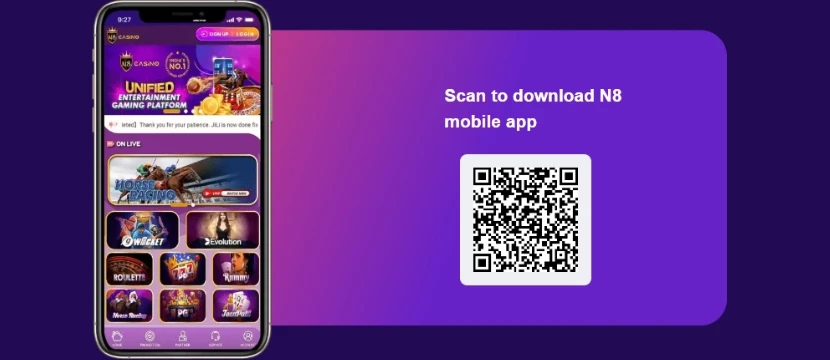
Players will not find the N8 casino app in Google Play or the App Store. Android installation starts with the N8 APK file from the official website, while iOS installation goes through customer support access. This adds a few more steps compared with a normal store download, so we split the process by device type below.
N8 App for Android
1Go to the N8 site – Use Chrome or any other browser on your phone to open the main page.
2Download the APK – Find the Android download button and tap it. The file should start downloading right away.
3Enable unknown sources – If your phone blocks the install, go to Settings, tap Security, and allow unknown apps.
4Install the app – Open the downloaded file, confirm the install, and wait a few seconds.
5Open the app – You’ll see the N8 icon on your home screen. Tap it and log in or sign up.
N8 App for iOS
1Ask for the iOS version – Go to the N8 website and open live chat. Tell support you want to install the app on iPhone.
2Follow their instructions – They’ll send a link and guide you through setup. It’s not the App Store, so expect a few extra steps.
3Complete the install – Accept the profile, confirm trust settings, and finish the installation.
4Start the app – Once it’s done, tap the icon, log in, and you’re good to go.
How to Update the N8 App to the Latest Version
The N8 app does not auto-update through Google Play or the App Store. To get the N8 app latest version, users need to manually check the website. Updating the app means repeating the download process with the most recent file.
Update on Android
1Visit the N8 website – Use your browser and go to the official page where the APK is available.
2Check the version number – Compare it with the version installed on your device (you’ll find it in app settings).
3Download the latest APK – If there’s a newer version, download the updated file.
4Install the new version – Open the file and install it. It will replace the previous version without deleting your data.
Update on iOS
1Revisit the site – If you’re using a Safari shortcut, simply reload the N8 homepage to ensure it shows the latest version.
2Clear browser cache (optional) – If the app view looks outdated, clearing Safari’s cache can refresh the interface.
3Ask support if unsure – For iOS users with a profile-based setup, contact support to confirm if a new version is available and how to access it.
Registration in the N8 Application
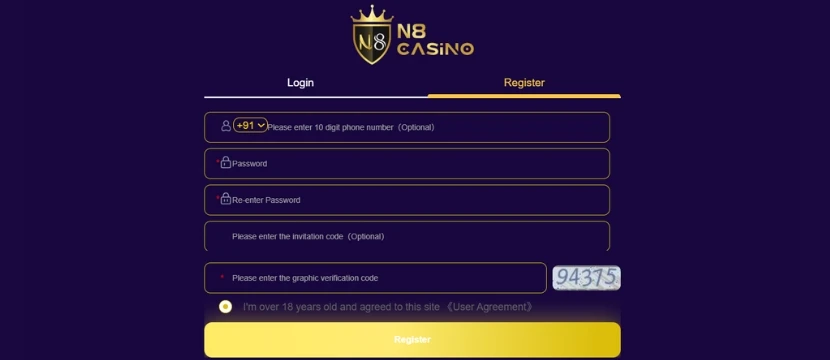
Signing up in the N8 casino app is simple, but there are no social or one-tap login options. You’ll need a working mobile number to create your account, and the process is the same for both Android and iOS versions. The referral code field is optional, and you won’t be asked to verify any documents during signup.
1Launch the N8 app – Tap the app icon on your device to open the home screen.
2Select “Sign Up” – You’ll find this at the bottom of the login form.
3Enter your mobile number and password – This becomes your login method. Add a referral code if you have one and continue.
4Access your account – Once submitted, the app will redirect you to the main lobby. You can start exploring games and deposit options right away.
Bonuses & Promotions
The N8 app has several promotions, although the claim process is not as automatic as players may expect. Most offers need a live chat request, and some rules should be confirmed with support before the first bet is placed. At the time of review, the main offers covered first deposits, referrals, and IPL-based sports betting activity.
Welcome Bonus
New users can request a welcome bonus after making a first deposit of ₹500 or more. N8 gives two options, and both must be claimed through live chat before any betting activity starts:
- Option 1: ₹300 bonus, ₹1,500 bet requirement, no withdrawal limit
- Option 2: ₹1,500 bonus, ₹30,000 bet requirement, withdrawal limited to 5× your deposit
The bonus does not appear in the account automatically. Players need to contact support, choose one of the two offers, and confirm the wagering rules before playing. The second option gives a larger bonus amount, although the ₹30,000 betting requirement and 5× deposit withdrawal cap make the terms much heavier. You can also read more about how casino welcome bonuses usually work to compare N8 rules with common market terms.
Referral Bonus
The referral offer starts with one basic rule: the invited player has to register through your link and deposit at least ₹500. After that, N8 calculates the reward by referral count, with higher extras added once more valid players join through the same account:
- 1st to 5th referrals: ₹500 each
- 6th to 10th: ₹500 + ₹200 extra per person
- 11th to 30th: ₹500 + ₹300 extra per person
- 31st and beyond: ₹500 each plus possible agent commission
Referral rewards are handled through live chat and must be requested the next day. N8 can reject the reward if the invited account looks duplicated, fake, or inactive after registration. The offer does not require documents by default, although fraud checks still apply.
IPL Exclusive Bonus
The IPL Exclusive Bonus targets players with very large sports deposits during the event period. The fixed reward depends on the total qualifying deposit amount:
- ₹50,00,000 to ₹1,49,99,999: ₹77,777 bonus
- ₹1,50,00,000 to ₹2,99,99,999: ₹1,77,777 bonus
- ₹3,00,00,000 to ₹4,99,99,999: ₹3,77,777 bonus
- ₹5,00,00,000 and above: ₹7,77,777 bonus
N8 credits the bonus after the IPL period finishes. To withdraw it, players have to complete a 1x rollover, with only sports bets at qualifying odds included in the count. The rules are strict, and the deposit amounts clearly point this offer toward high rollers.
Deposits & Withdrawals via the App
The N8 mobile app handles deposits and withdrawals inside the account area, although the payment flow still depends heavily on manual confirmation. Players should not expect a fully automated cashier with instant in-app processing for every step. In many cases, support has to confirm payment details, check requests, or guide users through the next action.
How to Deposit
1Launch the N8 app – Open the app and log in with your account.
2Tap “Deposit” – You’ll find it in the main wallet area or homepage.
3Choose a payment method – You’ll see local wallet apps, bank transfer options, and more.
4Enter how much you want to add – Usually starts from ₹500, but double-check before you continue.
5Follow instructions – You may get a QR code, payment ID, or support will guide you step by step.
How to Withdraw
1Open the wallet section – Tap your balance or profile icon to find the withdrawal option.
2Pick your method – It’ll usually match what you used to deposit, but options can vary.
3Enter payout details – This could be a wallet ID, phone number, or bank info.
4Submit and wait – Once you request the withdrawal, it goes to support for approval.
5Get your funds – You’ll get a message once the transfer is done. Delays are possible but usually resolved with a nudge to support.
Security of the N8 Application
The N8 mobile app uses standard account protection features, including password login, HTTPS connection, and in-app wallet access. During our check, account actions and payment pages stayed inside the app environment, which helps reduce unnecessary redirects. The app also appears to use device binding, so the account remains connected to the phone unless the user logs out or changes access.
N8 does not share much about the app’s deeper protection layer. We found the basics during testing, but details on 2FA, stored data handling, and payment monitoring are not clearly presented to users. That makes personal account hygiene important: use a strong password, keep the app on your own device, and ask support to check anything odd with login history or payments.
Support for the N8 Mobile App
N8 support is available through live chat and email, with live chat being the more practical option inside the app. During our review, this channel mattered more than usual because several actions depend on agent help, including bonus claims, payment confirmations, and some account checks. The FAQ is enough for simple app questions, while money-related issues still need chat support. Since replies can differ by agent, players should confirm exact terms, limits, and waiting times before following any instructions.
Possible Problems with the N8 App
Installation Errors on Android
Some users face errors while installing the APK, often because “Unknown Sources” is disabled. To fix this, go to your phone settings, find Security or Apps permissions, and allow installation from unknown sources. Also, ensure there’s enough storage and your Android version is compatible (5.0 or higher).
iOS Installation Confusion
iOS users may struggle because the app is a manual install, often a Safari shortcut. If you cannot install a full app, use the “Add to Home Screen” option in Safari. Contact support for the latest instructions and confirm if any profile installation is required.
Payment Delays
Deposits or withdrawals may take longer than expected due to manual processing. Always double-check payment details and confirm transactions via live chat. Keep screenshots of your transfers to speed up support responses in case of disputes.
Bonus Claim Issues
Bonuses must be claimed manually through support before betting. If your bonus is missing, contact live chat immediately. Provide deposit details and be clear about the bonus you want. Remember that unclear or delayed claims are common, so early communication helps.
Screenshots of the N8 App
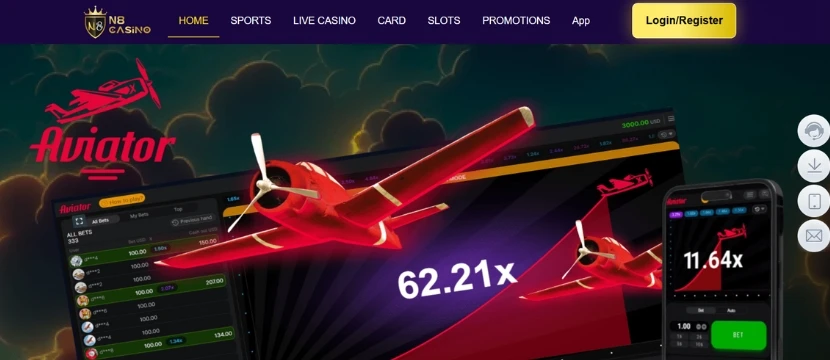
The N8 app features a simple and clean interface focused on usability. The home screen provides quick access to casino games, sportsbook, and wallet. Navigation is straightforward, with a bottom menu for switching between sections and minimal clutter, making it easy to use even on smaller screens.
Final Words
After testing the N8 app, I see it as a practical mobile option for players in India who want casino games and sports betting in one place. The Android version works as a full app, while the iOS version feels closer to a web shortcut, so iPhone users should know what they are installing before starting. The app handled regular use well during our check, including login, lobby browsing, game launch, and cashier access. Still, the missing public license details, manual installation, and support-based bonus and payment steps are important points to keep in mind.
A few notes can help players avoid the most common problems:
- Download the app only from the official N8 website.
- Ask support to confirm bonus rules before placing bets.
- Check payment limits and waiting times before making a deposit.
- Install new app versions manually when N8 releases updates.
Frequently Asked Questions
Is the N8 app safe to use?
The N8 app uses encrypted connections and standard security measures to protect your data. While licensing details aren’t fully public, using strong passwords and cautious practices is recommended.
Which devices are compatible with the N8 app?
The app works on most Android devices running version 5.0 or higher and on iPhones with iOS 11 or later. The iOS version functions as a browser shortcut, while Android users install a full app.
What payment methods can I use in the app?
N8 supports popular local payment options including wallet apps and bank transfers. Most payments are processed manually, so be prepared to confirm transactions with customer support.
How do I claim bonuses in the N8 app?
Bonuses are not automatic. After making a deposit, you need to contact live chat support and request the bonus before placing any bets.