
Betvisa Casino App
Looking for a fast, direct way to access Betvisa on your phone? Find out how to download and install it, to make real money deposits and keep the app updated manually. We’ve tested the Betvisa app ourselves to give you a full view of its features, security measures, and overall performance. Whether you’re new to mobile gambling or prefer avoiding app store restrictions, you’ll find clear and practical answers right here.





100% up to $1000
Play on Bet365 (Casino)?
Claim bonus



In this guide you will find:
- Betvisa App Review
- Features & Functions
- Compatibility with Devices
- How to Download and Install the Betvisa App
- How to Update the Betvisa App to the Latest Version
- Registration in the Betvisa Application
- Bonuses & Promotions
- Deposits & Withdrawals via the App
- Security of the Betvisa Application
- Support for the Betvisa Mobile App
- Possible Problems with the Betvisa App
- Screenshots of the Betvisa App
- Summary
- Frequently Asked Questions
Betvisa App Review
| Feature | Details |
|---|---|
| Compatible Operating Systems | Android 5.0 or higher; iOS 10.0 or later |
| Betvisa App Download Link | Check app page on your regional site |
| Download Cost | Free |
| App Category | Sports Betting, Casino Games |
| Promo Code | Check your casino promotion page |
| Welcome Bonus | It varies depending on your country. |
| Supported Countries | Bangladesh, India, Indonesia, Pakistan, Philippines, Thailand, Vietnam |
| Application Languages | English, Bengali, Hindi, Indonesian, Filipino, Thai, Vietnamese |
| License | No license |
| Customer Support | 24/7 Live Chat and Email |
According to our experts, the Betvisa app is a practical solution for players who want a reliable gambling platform directly on their mobile devices. We have examined all possible aspects of the Betvisa mobile app, from installation to gameplay, and found that it provides a smooth and interactive gaming experience across different systems.

Players should be aware that Betvisa operates without an officially recognized national license. While some versions mention Curacao registration, regulation, and player protection are limited. Because Betvisa targets multiple regions, the brand uses different mirror sites depending on the country. To download the Betvisa app safely, users should always access the official regional version to get the correct Betvisa APK or mobile app link.
The Betvisa APK is available for quick download and runs perfectly on Android phones. For iOS users, the Betvisa app latest version can be installed manually or accessed through an optimized mobile platform without complications.
Features & Functions
The Betvisa app is designed for players who want fast and direct access to real-money gaming. New users can register an account easily within the application and save their login details for quicker access in the future. Deposits and withdrawals are handled directly through the Betvisa mobile app using trusted payment systems, without needing to switch to external platforms.
Players can place sports bets across a wide range of events, spin slots, join live casino tables, or explore a large Betvisa cricket section tailored for fans of the sport. The app also grants access to current promotions and the loyalty program. According to our Betvisa app test, the interface remains clean and stable on both Android and iOS, while features like real-time notifications and in-app customer support chat add extra convenience for players.
Compatibility with Devices
The Betvisa mobile app is designed to run smoothly across common Android and iOS systems. Android users can download the official Betvisa APK directly from the site, while iOS users can access the app through a web version optimized for Safari. According to our experts, Betvisa keeps the interface lightweight, focusing on fast betting, simple game navigation, and quick access to account features. The app does not require the newest devices — it works reliably even on mid-range smartphones and tablets.
| Parameters | Android | iOS |
|---|---|---|
| Operating system version | Android 12.0 and later | iOS 13.0 and later |
| Compatible devices | Smartphones and tablets from major brands like Samsung, Xiaomi, Huawei | iPhone and iPad (browser-based access) |
| Availability | APK download from the official Betvisa website | .ipa file download from the official Betvisa website |
| User interface | Lightweight design with fast access to games and sports betting | Touch-friendly layout adjusted for iPhone and iPad screens |
How to Download and Install the Betvisa App

Since the Betvisa app isn’t available in official stores, players need to download it manually through the website. The process is different for Android and iOS, and you’ll need to adjust a few settings before the app will run.
Betvisa App for Android
1Open the Betvisa website – Use your Android device and go to the official Betvisa homepage. Tap the small phone icon at the top of the page.
2Download the APK file – In the pop-up window, tap "Download for Android" and wait for the Betvisa APK file to save.
3Allow unknown sources – Open Settings → Security and allow app installations from unknown sources to proceed with the install.
4Install the app manually – Find the downloaded APK file in your Downloads folder, tap it, and complete the installation. It should take less than a minute.
5Launch and log in – Once installed, the Betvisa app will appear on your home screen. Open it, log in with your account details, or register if you're a new user.
Betvisa App for iOS
1Visit the Betvisa site – Open Safari on your iPhone or iPad and access the official Betvisa homepage. Scroll to the bottom of the page.
2Find the Download section – Tap the "More" tab, enter the Download section, and choose either "Download 1" or "Download 2" to save the IPA file.
3Start the installation – After the IPA file downloads, open it from your Downloads folder to begin installation.
4Trust the developer profile – Go to Settings → General → Device Management and trust the Betvisa developer profile to allow the app to run.
5Open the app and log in – When setup is complete, open the Betvisa app from your home screen and log in using your credentials.
Note: Betvisa uses an enterprise certificate for iOS apps. If Apple revokes it, you might need to reinstall the app later.
How to Update the Betvisa App to the Latest Version
Since the Betvisa app isn’t listed in app stores, updates don’t happen automatically. Players need to manually check the Betvisa website for the latest version. If there’s a new file available, you’ll have to reinstall the app yourself.
Updating on Android
1Open the Betvisa website – Access the Betvisa homepage using your Android device.
2Tap the phone icon – Check if a new APK version is available for download.
3Download the latest APK – If available, download the updated APK file manually.
4Delete the old app – Uninstall the existing Betvisa app from your device before proceeding.
5Install the new version – Find the new APK in your Downloads folder and install it just like the original.
Updating on iOS
1Visit the Betvisa site – Open Safari and go to the Betvisa homepage.
2Check the Download section – Scroll down, tap More, and check if a new IPA file is available.
3Download the new IPA – If available, download the latest IPA file to your device.
4Remove the old app – Delete the previous version of the Betvisa app from your iPhone or iPad.
5Install and trust the new version – Open the new IPA file and, if required, trust the updated developer profile again in your settings.
Registration in the Betvisa Application
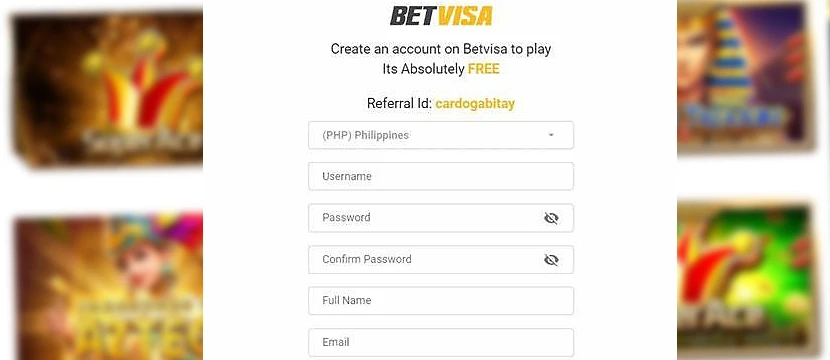
Before you can start betting or playing in the Betvisa app, you’ll need to set up a real account. The process is built directly into the Betvisa mobile app — no browser redirects, no complicated steps. You register once, and your account will work across all sections, whether it’s sports betting, live casino, or Betvisa’s cricket markets.
To complete registration, players must enter a mobile number, create a password, and optionally add a promo code during signup. It’s a fast process, but make sure your details are accurate — Betvisa may ask for verification when you try to withdraw real money later. Registration is simple, but doing it properly saves a lot of time down the line.
How to Register in the Betvisa App
1Open the Betvisa app – Launch the Betvisa app on your phone or tablet.
2Tap "Join Now" – Tap the "Join Now" button at the top-right corner of the homepage to open the signup form.
3Fill out the form – Create a nickname, choose a password, and enter your full name, phone number, and preferred currency.
4Confirm your information – Read Betvisa’s Terms and Conditions, confirm you’re of legal age, and agree to the rules.
5Complete your registration – Tap "Join Now" again to finalize your registration and start playing.
Bonuses & Promotions

The Betvisa app offers a range of bonuses aimed at both new and returning players. From the welcome bonus to the VIP loyalty program, the platform gives users plenty of reasons to stay active. All promotions can be accessed directly through the Betvisa mobile app after registration.
Welcome Bonus
New players can claim a welcome bonus on their first deposit for sports betting. The offer is available immediately after registration and deposit, giving users a head start in building their bankroll. Terms and conditions apply, including wagering requirements that must be completed before withdrawing bonus funds.
VIP Program
Betvisa runs a VIP loyalty program where players earn rewards based on their activity. The more you bet and play, the higher your VIP level climbs, unlocking cashback deals, special bonuses, and personal account managers. VIP status is reviewed regularly, and benefits are delivered directly through the app.
Deposits & Withdrawals via the App

The Betvisa mobile app makes handling real-money transactions simple enough, but players should be ready for a hands-on process. There’s no flashy one-click banking here — deposits and withdrawals must be done manually, using trusted local services. Still, the Betvisa app provides fast access to your balance and keeps everything under one roof, without needing to switch to external platforms. Whether you’re topping up your account or cashing out a big win, the process stays inside the Betvisa app for Android and iOS users.
How to Deposit via Betvisa App
1Log into your Betvisa account – Open the Betvisa app and tap the wallet icon on the home screen.
2Open the Deposit menu – Select "Deposit" from the available options.
3Choose a payment method – Pick from local bank transfers, mobile wallets, or other regional services offered inside the app.
4Enter the deposit amount – Type the amount manually and follow any redirection if needed to your bank app or wallet.
5Confirm and refresh your balance – After completing the payment, return to the Betvisa app and check that your deposit has been added.
How to Withdraw via Betvisa App
1Access the Withdraw section – Tap the wallet icon again and select "Withdraw."
2Pick your withdrawal method – Choose the method linked to your account or select another available option.
3Enter the withdrawal amount – Type the exact amount you want to cash out carefully.
4Submit the request – Confirm your withdrawal and send the request for Betvisa’s approval.
5Wait for processing – Most requests are reviewed within a few hours, but it can take up to 48 hours depending on the payment service you used.
Security of the Betvisa Application
The Betvisa mobile app keeps player accounts protected with basic measures like encrypted logins and secure payment channels. New users are asked to set strong passwords, and withdrawals often require identity confirmation. While the app covers essential security needs, it does not operate under strict international licenses, so players must stay proactive.
To get the safest experience, it’s important to download the Betvisa app latest version only from the official website. Updates are handled manually, and skipping them can leave accounts more vulnerable. Using trusted devices, avoiding public Wi-Fi, and enabling security settings on your phone are small but important steps that make a big difference inside the Betvisa mobile app.
Support for the Betvisa Mobile App
Players can reach Betvisa’s support team directly through the app whenever help is needed. A live chat option is available around the clock, along with email support for more detailed questions. The response time through live chat is usually fast, although complex issues might take longer to resolve. Support agents assist with everything from account problems to payment questions. While the service is responsive, players should remember that help is handled regionally, and communication may sometimes depend on the local team’s availability.
Possible Problems with the Betvisa App
While the Betvisa mobile app is functional, it’s not without its issues. Some problems are linked to manual installation, others to account management. Here are the most common problems players might face — and how to solve them without turning it into a bigger headache.
Betvisa App Won’t Install (Android)
If the Betvisa apk won’t install, the most common cause is a device security setting. Make sure "Install Unknown Apps" is allowed for your browser or file manager. Also, check if you downloaded the latest version of the Betvisa app for Android from the official site — older APK files can fail to install properly.
Login Issues After Registration
Some users report trouble logging in right after creating an account. If this happens, double-check that you completed the full registration in the Betvisa mobile app, including verifying your phone number. If problems persist, clear the app’s cache or reinstall the latest Betvisa app version to reset your session.
Withdrawal Delays
Withdrawals in the Betvisa casino app are manually reviewed, not processed instantly. Delays can happen if your account verification isn’t complete or if you request a withdrawal outside normal review hours. Always complete full verification early and use a supported payment method to speed things up.
App Update Problems
Since the Betvisa app must be updated manually, players sometimes continue using an outdated version without realizing it. This can cause glitches or login failures. Always download the Betvisa app latest version from the official website, uninstall the old app first, and then install the new file fresh.
Screenshots of the Betvisa App
The Betvisa mobile app focuses on functionality first. It doesn’t aim to impress with flashy animations — instead, it keeps things direct. From the home screen to the wallet section, everything is built to get you where you need to go without distractions.
Navigation is simple: sports betting, casino games, and account settings are separated clearly. Pages load quickly, and deposit and withdrawal options are placed up front where players can reach them without digging through menus. It’s built more for speed than for style, which fits the app’s purpose.
Summary
Throughout this article, I have evaluated the Betvisa app based on legality, usability, interface, and stability. After carefully reviewing every step — from installation to payments — our team has recognized that the Betvisa mobile app is a functional but manual platform designed for players who don’t mind taking a few extra steps.
In terms of legality, Betvisa operates without strict licensing, meaning users should stay cautious and protect their accounts. Usability is a strong point: the app focuses on speed and clarity rather than flashy design. The interface is straightforward, keeping deposits, withdrawals, and support close at hand. As for stability, the app holds up well under normal use, but players must manually update it to avoid technical problems.
Overall, the Betvisa mobile app offers a no-frills, straightforward way to access real-money gaming — but it rewards players who stay alert and proactive.
Quick Tips:
- Download the Betvisa app latest version only from the official website.
- Verify your account early to speed up withdrawals.
- Watch for app updates manually to avoid interruptions.
Frequently Asked Questions
Is the Betvisa app available on Google Play or the App Store?
No. The Betvisa app is not listed in the Play Store or App Store. It must be downloaded manually from the official Betvisa website as an APK for Android or an IPA file for iOS.
Is the Betvisa mobile app safe to use?
Yes. The Betvisa mobile app uses encryption to protect personal information and payment data. However, since Betvisa operates with limited licensing, players should download the app only from the official website and follow security best practices.
How do I install the Betvisa app on Android?
Visit the official Betvisa website, download the Betvisa APK file, allow “Unknown Sources” in your device settings, and complete the manual installation on your Android phone or tablet.
Can I make deposits and withdrawals through the Betvisa app?
Yes. You can deposit and withdraw directly through the Betvisa app by tapping the wallet icon and choosing your preferred payment method. Transactions are handled inside the app without switching to a browser.
How do I update the Betvisa app to the latest version?
To update, you need to manually download the latest version of the Betvisa app from the official website. Uninstall the old app first if necessary, then install the new file following the same steps as the original setup.