

Win Spirit Casino App
Looking for a quick and direct way to access Win Spirit on your phone? Find out how to install it through your browser to manage real money transactions and use bonus features. We’ve tested the Win Spirit app firsthand to give you a full breakdown of its usability, security, and performance. Whether you’re new to mobile gambling or just want a smooth experience without going through an app store, you’ll find straightforward, expert-tested answers.
In this guide you will find:
- Win Spirit App Review
- Features & Functions
- Compatibility with Devices
- How to Download and Install the Win Spirit App
- How to Update the Win Spirit App to the Latest Version
- Registration in the Win Spirit Application
- Bonuses & Promotions
- Deposits & Withdrawals via the App
- Security of the Win Spirit Application
- Support for the Win Spirit Mobile App
- Possible Problems with the Win Spirit App
- Screenshots of the Win Spirit App
- Summary
- Frequently Asked Questions
Win Spirit App Review
| Feature | Details |
|---|---|
| Compatible Operating Systems | Android 6.0 or higher; iOS 9.0 or later |
| Application Version | PWA (Progressive Web App) for Android and iOS |
| Win Spirit App Download Link | https://winspirit.com/en/play-with-the-app |
| Download Cost | Free |
| App Category | Online Casino / Real Money Gambling |
| Promo Code | Not required |
| Welcome Bonus | Up to $400 + 100 Free Spins |
| Supported Countries | 196 countries (including Canada, Australia, New Zealand) |
| Application Languages | English, French, German, Italian, Portuguese, Spanish |
| License | Curaçao Gaming Control Board (GCB). |
| Customer Support | 24/7 Live Chat and Email |
According to our experts, the Win Spirit casino app is a user-friendly solution that works through a modern Progressive Web App system. This means you can install it directly from the browser without needing Google Play or the App Store. We have examined all possible aspects of the Win Spirit mobile app and confirmed it works well on both Android and iOS devices.
The application offers a generous welcome package of up to $400 plus 100 free spins and supports players from nearly every region in the world. Its multilingual interface, trustworthy Curacao license, and responsive 24/7 support make it a strong option for anyone looking for a reliable and interactive gambling experience on mobile. For those seeking a real money gaming platform, the Win Spirit app is simple to install and completely free to use.
Features & Functions
The Win Spirit app is built to deliver a complete real money casino experience on mobile. It provides access to all standard casino sections, including slots, table games, and live dealer titles. Players can register, log in, deposit, and withdraw funds directly through the app interface. The layout is optimized for touchscreens and supports fast navigation between games and account functions. Bonus activation, promo tracking, and responsible gambling tools are also available. Since it’s a Progressive Web App, updates are applied automatically without the need to reinstall. The application runs smoothly across both Android and iOS devices, keeping all features identical to the desktop version.
Compatibility with Devices
The Win Spirit mobile app is based on PWA technology, making it accessible across most smartphones and tablets without downloading from an app store. According to our experts, this browser-based approach keeps system requirements minimal. The app runs smoothly even on older devices, as long as the browser supports service workers and basic HTML5 standards. Most Android phones from version 6.0 onward and iPhones with iOS 9 or higher will work without issues.
| Parameters | Android | iOS |
|---|---|---|
| Operating system version | Android 6.0 or later | iOS 9.0 or later |
| Compatible devices | All major brands with updated browsers | iPhone and iPad using Safari |
| Availability | Install via Chrome or other supported browser | Install via Safari browser |
| User interface | Touch-optimized with full site functionality | Responsive layout for iPhone and iPad screens |
How to Download and Install the Win Spirit App
The Win Spirit app installs directly through your browser using PWA technology. No APK files, no app stores. Once added to your home screen, the app opens in full screen with access to all account features, games, and payments. Installation takes less than a minute and works on most smartphones.
How to Install on Android
1Open Chrome – Use your Android device to open Chrome.
2Enter the Win Spirit address – Type the official URL in the address bar and load the homepage.
3Tap the three-dot menu – Located in the top-right corner of the browser.
4Select “Install App” – Confirm when prompted. The system will add the icon automatically.
5Open Win Spirit – Tap the new icon on your home screen to launch the app.
How to Install on iOS
1Launch Safari – Use Safari on your iPhone or iPad. Other browsers won’t work.
2Navigate to the Win Spirit homepage – Enter the address manually and wait for the page to load fully.
3Press the Share button – The square icon with an arrow at the bottom of your screen.
4Choose “Add to Home Screen” – Scroll the options and tap this item to create a shortcut.
5Launch the app – The icon appears instantly. Tap it to start using the Win Spirit app.
How to Update the Win Spirit App to the Latest Version
The Win Spirit app doesn’t use version numbers or manual updates. It always runs the latest build served by the website. If you see outdated content or interface glitches, your device is likely using a cached version. In that case, use the steps below to clear it and reload the updated app.
How to Update on Android
1Open the app – Tap the Win Spirit icon from your home screen.
2Pull down to refresh – This forces the app to check for new content.
3Clear browser cache – Go to Chrome → Settings → Privacy → Clear browsing data → Cached images and files.
4Reopen the app – Launch the icon again to load the current version.
How to Update on iOS
1Launch the app – Tap the Win Spirit shortcut on your home screen.
2Swipe down on the screen – This triggers a manual refresh.
3Clear Safari cache – Go to iOS Settings → Safari → Clear History and Website Data.
4Reopen the app – The updated version will load automatically.
Registration in the Win Spirit Application
Registration in the Win Spirit app is built into the homepage. You don’t need to switch tabs, open emails, or complete extra verification during sign-up. The form is short, and you’ll be logged in immediately after creating your account. Here’s how it works from start to finish.
1Open the app – Tap the Win Spirit icon to launch the app on your device.
2Select “Sign Up” – The button is in the top-right corner of the homepage.
3Enter your details – Type your email, create a password, and choose a currency. No phone number is required.
4Agree to terms – Tick the checkbox to confirm your age and accept the terms of service.
5Create the account – Tap “Create Account.” Your profile will open instantly with no additional steps.
Bonuses & Promotions
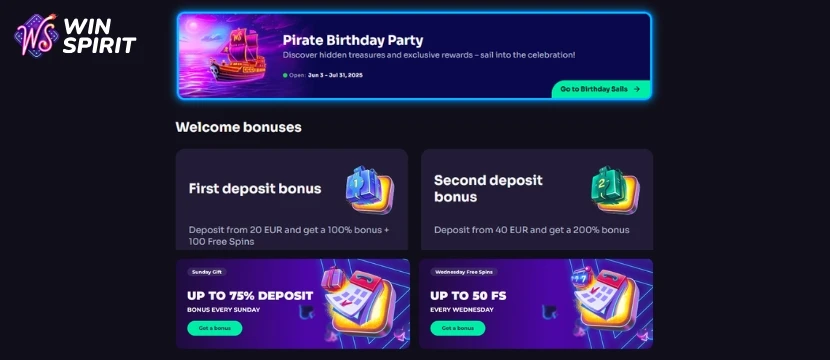
The Win Spirit app includes a full set of bonuses available right after registration. You get a welcome package, app-specific rewards, and access to a long-term loyalty system with cashback and level-based perks. Bonus activation is handled directly through your profile, and most offers are applied automatically once claimed.
Welcome Bonus
New players can receive up to €400 and 100 free spins after registration. The offer is spread across initial deposits and can be used on selected slots. This Casino Welcome Bonus is available whether you sign up via the app or desktop version.
App Bonus
Every new user who installs the Win Spirit app gets 20 free spins with no deposit required. Spins are credited at a €0.10 stake and come with a 40x wagering requirement. To claim the no deposit bonus:
- Install the Win Spirit Casino app
- Log in to your account
- Open your profile and activate the bonus under the “Bonuses” tab
This bonus is only available once and applies to new installs. Spins are credited automatically after activation.
Loyalty Program
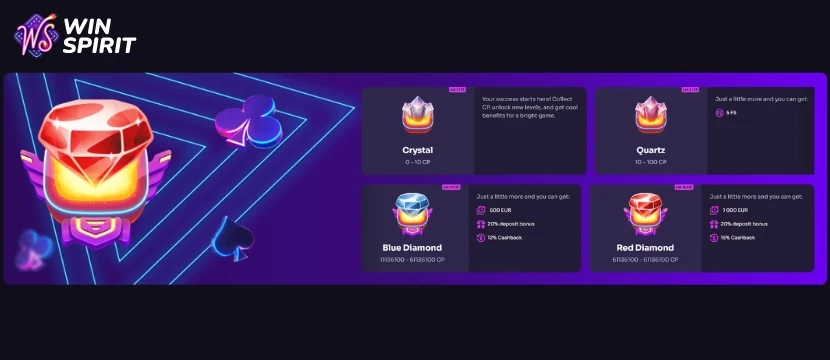
All users are automatically enrolled in Win Spirit’s Loyalty Program starting from the Crystal tier. There are 12 levels, each tied to your gameplay activity. Higher levels unlock bigger rewards such as deposit bonuses, cashback, and free spins. Progress is tracked using CP — 1 CP is earned for every €1 wagered on eligible slots. Live games, bonus buy slots, and table games are excluded.
Level rewards include:
- Quartz: 5 FS
- Amethyst: 10 FS
- Amber: 75% deposit bonus, 2% Cashback
- Pearl: 30% deposit bonus, 3% Cashback, 15 FS
- Black Opal: 75% deposit bonus, 4% Cashback
- Emerald: 30% deposit bonus, 5% Cashback, 30 FS
- Ruby: 30% deposit bonus, 7% Cashback, 30 FS
- Sapphire: 30% deposit bonus, 8% Cashback, 50 FS
- Pink Diamond: 20% deposit bonus, 10% Cashback, €200
- Blue Diamond: €500 bonus, 20% deposit bonus, 12% Cashback
- Red Diamond: €1,000 bonus, 20% deposit bonus, 15% Cashback
Cashback Details
Cashback is available weekly and works as a no-deposit bonus. The percentage depends on your loyalty level and ranges up to 15%. Cashback is calculated from your net loss for the week and credited every Thursday. Unused cashback expires on Friday at 23:59 UTC. The minimum payout is €1. Cashback can be activated in the Bonuses section of your profile.
Deposits & Withdrawals via the App
All payment features in the Win Spirit app mirror the desktop version. You can deposit, withdraw, and track your transaction history without leaving the app. Payment processing is smooth, and most methods are available across supported regions. Below are the exact steps for handling deposits and withdrawals through the mobile interface.
How to Deposit
1Open the app and log in – Tap the Win Spirit icon and enter your credentials.
2Go to the Cashier – Tap your profile icon, then select “Deposit.”
3Select a payment method – Choose from bank cards, e-wallets, crypto, or local options (depending on your country).
4Enter the amount – Fill in the deposit sum and follow the instructions provided for your chosen method.
5Confirm the transaction – Once processed, the balance will update instantly or within a few minutes.
How to Withdraw
1Access your account – Log in through the app and open the Cashier section.
2Select “Withdraw” – This option is available under your wallet or profile menu.
3Choose a method – Use the same method as your deposit, if supported.
4Fill in the amount – Enter how much you want to withdraw and confirm the request.
5Wait for processing – Withdrawal time depends on the method but usually ranges from a few hours to 3 working days.
Security of the Win Spirit Application
The Win Spirit app runs as a PWA, which means it doesn’t ask for extra permissions or access to your device. Everything happens through your browser under HTTPS encryption, with no downloadable files involved. Payments are handled by licensed providers, and card data is never stored in the app. Login sessions are secured through tokens, and account changes are flagged automatically. You can track devices logged into your account and sign out remotely if needed. No third-party tracking, no pushy integrations — just a browser-based app that keeps your personal and payment data locked down.
Support for the Win Spirit Mobile App
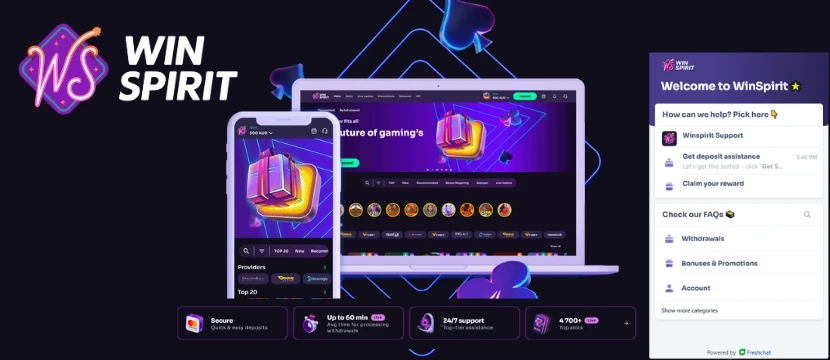
Win Spirit provides in-app support through live chat and a contact form. Both options are available without logging out or switching to desktop. Response time is fast, and the team handles payment delays, login problems, bonus activation, and general account issues. If needed, players can also contact support by email. A short FAQ is available inside the app for basic troubleshooting. No third-party apps or redirects are used — everything works inside the mobile interface.
Possible Problems with the Win Spirit App
The Win Spirit app is generally stable, but users may run into a few common issues. Most of them are tied to browser settings, caching, or connection problems rather than the app itself. Below are typical problems and how to fix them without reinstalling or switching devices.
App Not Installing
If the “Install App” option does not appear in your browser, check that you are using Chrome on Android or Safari on iOS. PWAs only install through supported browsers. Clear your browser cache and reload the homepage. If the problem continues, check your device storage and make sure permissions are not restricted by system settings or extensions.
Login Page Not Loading
This usually happens when the browser is holding outdated files. Clear your browser cache and refresh the page. If that doesn’t work, close the app completely and reopen it. A stable internet connection is also required, so avoid public networks that may block some functions.
Bonuses Not Showing
Bonuses like free spins or cashback may not appear if they haven't been activated in your profile. Go to the Bonuses tab and check if the offer is listed. If it is missing or inactive, contact support through live chat. Bonus visibility may also depend on your current status or region.
App Looks Outdated
If the app doesn’t reflect recent updates or content, you’re likely viewing a cached version. Swipe down to refresh or close and reopen the app. If it still looks outdated, clear your browser’s cached files and cookies. You do not need to uninstall or reinstall the app — all updates load from the server.
Screenshots of the Win Spirit App
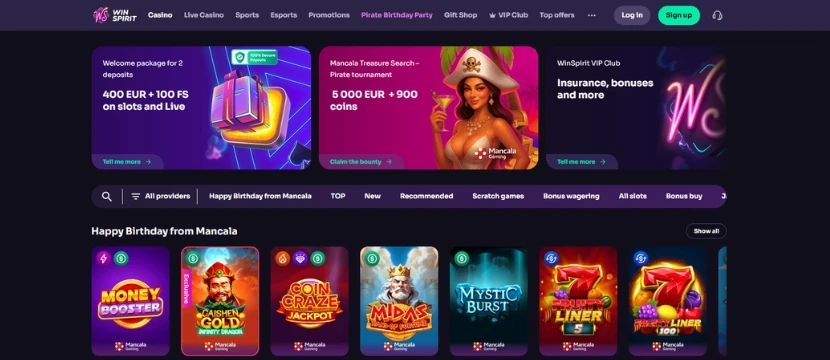
The interface sticks closely to the desktop layout but scales well for mobile. Game thumbnails are sharp, and scrolling is responsive even on older devices. Key sections like Bonuses, Wallet, and Live Chat are always one tap away. There’s no loading clutter, pop-ups, or forced banners, which keeps navigation fast and distraction-free.
Final Words
I’ve evaluated the Win Spirit app based on what matters most: legality, usability, interface, and overall stability. After testing everything from registration to withdrawals, our team agrees it delivers a smooth, secure mobile experience. The app is fully licensed (Curacao), works straight from your browser with no downloads, and holds up well even on mid-range devices. All key features are there: games, payments, bonuses, and support. Nothing feels hidden or overcomplicated.
It’s clear the developers focused on making mobile feel just as functional as desktop, without pushing unnecessary extras. If you’re looking for a legit way to play on mobile, the Win Spirit app holds up. No major issues, just occasional browser hiccups that are easy to clear. The no deposit spins for installing the app and the loyalty levels are a nice touch, too.
- Install the app through Chrome or Safari, not other browsers.
- Activate your app bonus manually from the Bonuses tab.
- If something looks off, a quick cache clear usually fixes it.
Win Spirit App FAQ
Is the Win Spirit app safe to use?
Yes. The Win Spirit app runs as a secure PWA and doesn’t require any downloads or special permissions. All data is transmitted over encrypted connections, and payments are processed through trusted providers. The platform is fully licensed under Curacao jurisdiction.
How do I claim the no deposit bonus in the app?
First, install the Win Spirit app using your mobile browser and log into your account. Then go to the Bonuses tab in your profile and activate the 20 free spins. The bonus is available once per user and does not require a deposit. Spins are credited automatically after activation.
Can I deposit and withdraw money through the app?
Yes. The app supports full account functionality, including deposits and withdrawals. You can select your preferred method, enter the amount, and confirm the transaction directly inside the app. No need to switch to desktop or open external pages.
What should I do if the app doesn’t update?
The app updates automatically from the server. If it looks outdated, try pulling down to refresh or clear your browser cache. You don’t need to reinstall or download anything. A simple refresh usually loads the latest version.