

BC.Game App
Looking for a fast, secure way to play BC.Game on your mobile device? Find out how to install it, make your first deposit, and remove it if needed. We’ve tested the application across Android and iOS to give you a complete view of its features, safety, and performance. Whether you're new to the platform or just want quicker access without relying on app stores, you’ll find all the key details right here.
In this guide you will find:
- BC.Game App Brief Review
- BC.Game App Screenshots
- Requirements for Installing
- How to Install a BC.Game Mobile App on Android
- How to Install a BC.Game Mobile App on iOS
- Why BC.Game App is not Available in PlayMarket and AppStore
- How Safe is the Mobile Version of BC.Game App
- How to Log In to BC.Game App From the Mobile Application
- How to Make Your First Deposit Through the App
- How to Uninstall the BC.Game App App
- Final Thoughts
- Frequently Asked Questions
BC.Game App Brief Review
| Feature | Details |
|---|---|
| Compatible Operating Systems | Android (Web App via Google Chrome), iOS (Web App via Safari shortcut) |
| Application Version | Progressive Web App (PWA) – Auto-updating |
| BC.Game App Download Link | https://bc.game/app_download/android |
| Download Cost | Free |
| App Category | Crypto Casino & Sports Betting |
| Promo Code | Automatically applied upon registration |
| Welcome Bonus | Up to $1,000 + 150 Free Spins |
| Supported Countries | 242 countries worldwide |
| Application Languages | Zhōngwén, Chinese, English, Finnish, French, German, Hindi, Italian, Polish, Portuguese, Russian, Spanish, Thai, Turkish, Vietnamese |
| License | Curaçao Interactive Licensing (CIL) |
| Customer Support | 24/7 Live Chat and Email Support |
According to our experts, the BC.Game app delivers a reliable and user-friendly gambling experience across both Android and iOS platforms. The application functions as a Progressive Web App (PWA), meaning it updates automatically without the need for repeated manual downloads. We have examined all possible technical aspects, including compatibility, supported languages, and licensing, and can confirm that the BC.Game app meets modern standards for mobile gaming.
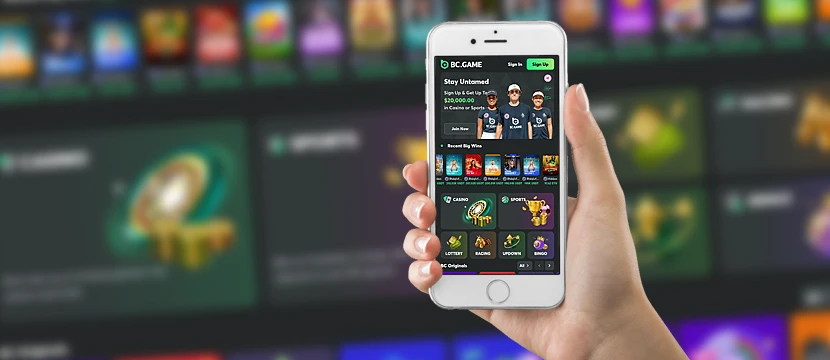
With availability in 242 countries, support for 15 languages, and a direct download cost of zero, the BC.Game mobile app offers convenient access to crypto casino games and sports betting markets worldwide. The official Curaçao Interactive Licensing ensures a trustworthy environment, while 24/7 customer support provides help whenever needed.
BC.Game App Screenshots
Curious about what the BC.Game app looks like before you install it? We have examined all possible areas of the BC.Game mobile app — from the gaming lobby to the personal account section — and the layout is clearly designed for an interactive and effortless gaming experience. Below, you can see a few screenshots that highlight the app’s clean and organized interface.

The BC.Game casino app keeps everything within easy reach — whether you’re browsing games, checking bonuses, or handling your gambling transactions. No matter if you download the BC.Game app for free on Android or install the BC.Game app for iPhone, the application stays lightweight, fast, and easy to use across all platforms.
Requirements for Installing
The BC.Game application is built to run smoothly across most modern platforms, but a few basic specs are still important to guarantee a stable gaming experience. Before you jump into downloading, it’s worth checking whether your device meets the official requirements. We have examined all possible details to ensure players can enjoy a trustworthy, lag-free setup from the start.
| Requirement | iOS | Android |
|---|---|---|
| Operating System | iOS 11.0 or later | Android 6.0 (Marshmallow) or later |
| Minimum Storage | 100 MB | 100 MB |
| RAM | 1 GB | 1 GB |
| Processor | A9 chip or later | 1.2 GHz quad-core processor or higher |
| Internet Connection | Stable internet connection | Stable internet connection |
| Additional Requirements | Age 18+ for gambling apps | Location services enabled for some regions |
How to Install a BC.Game Mobile App on Android
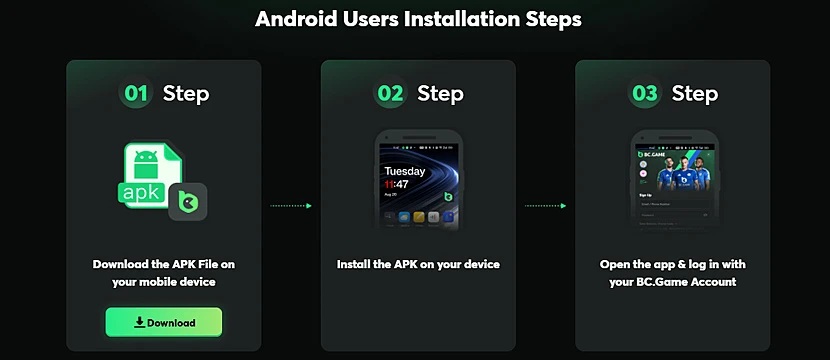
Unlike traditional apps that require an APK download, the BC.Game mobile app is installed as a Progressive Web App (PWA) directly through your browser. This method offers a fast, official, and trustworthy way to access BC.Game without needing a Play Store download. We have examined all possible installation paths and confirmed that setting up the BC.Game app on Android takes just a few taps.
1Open your browser – Launch Google Chrome or your preferred browser on your Android device to begin the installation process.
2Visit the official BC.Game site – Type in the BC.Game URL in the address bar and access the platform directly from your browser.
3Add BC.Game to your home screen – Tap the menu icon (three vertical dots or a gear symbol) in the top-right corner of your browser and select “Add to Home screen.”
4Name the shortcut and confirm – Choose a name for the shortcut if prompted, then tap “Add” to place it on your home screen.
5Launch BC.Game anytime – Tap the shortcut icon to instantly access BC.Game. It will function like a native app within your browser, giving you quick access to your account and games.
How to Install a BC.Game Mobile App on iOS
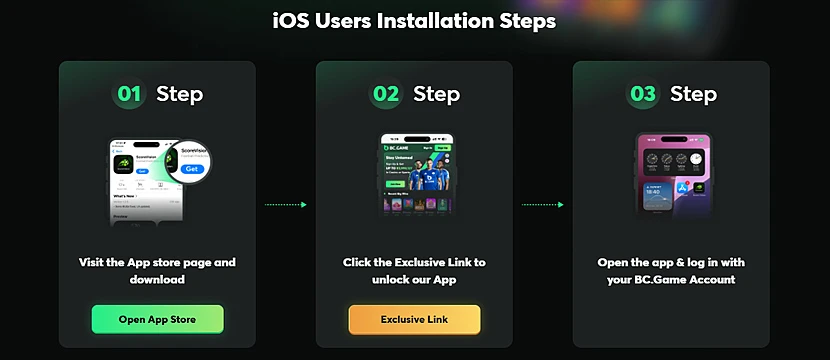
Setting up the BC.Game app for iOS is quick and fully official, thanks to its Progressive Web App (PWA) technology. Instead of searching the App Store, you can add the BC.Game application directly to your home screen using Safari — keeping access to your favorite gambling platforms just one tap away. We have examined all possible methods to ensure the process is trustworthy, fast, and gives players a seamless gaming experience on iPhone and iPad devices.
1Open Safari – Launch Safari on your iPhone or iPad. This browser offers the best compatibility for integrating web applications into iOS devices.
2Visit the BC.Game website – Type the official BC.Game URL into Safari’s search bar and access the platform directly.
3Add to Home Screen – Tap the share icon (a square with an upward arrow) at the bottom of the Safari window, then scroll through the options and select “Add to Home Screen.”
4Name and confirm the shortcut – Enter a name if prompted, then tap “Add” in the top-right corner to place the BC.Game icon on your home screen.
5Launch BC.Game easily – Tap the new icon anytime to open BC.Game in Safari. The shortcut behaves like a native app, providing instant access to your account and games.
Why BC.Game App is not Available in PlayMarket and AppStore
If you’re searching for the BC.Game app on Google Play or the App Store, you won’t find it. That’s completely normal. Like many real money gambling platforms, BC.Game operates under strict international licensing, which limits the ability to publish official applications in these stores. Both Google and Apple have specific policies restricting the distribution of casino apps, especially when they involve crypto transactions.
Instead, BC.Game offers an official, browser-based application that can be easily installed through a few quick steps on Android and iOS. We have examined all possible access options and confirmed that this method remains trustworthy, secure, and fully functional, delivering the full gaming experience without needing a traditional app store listing.
How Safe is the Mobile Version of BC.Game
Security is a top priority when it comes to mobile gambling, and BC.Game delivers strong measures to protect its players. The mobile version uses advanced encryption protocols to secure personal information, financial transactions, and gaming activity across all platforms. Whether you access the site through the BC.Game app for Android, the BC.Game app for iOS, or directly through your browser, the application maintains the same level of safety as the desktop version.
We have examined all possible security aspects of the BC.Game mobile app and found it to be trustworthy and reliable. Built under Curaçao Interactive Licensing (CIL) regulations, the mobile platform meets international standards for online gambling operations. Combined with active account verification processes and optional two-factor authentication, BC.Game ensures a secure gaming experience for all mobile users.
How to Log In to BC.Game App From the Mobile Application
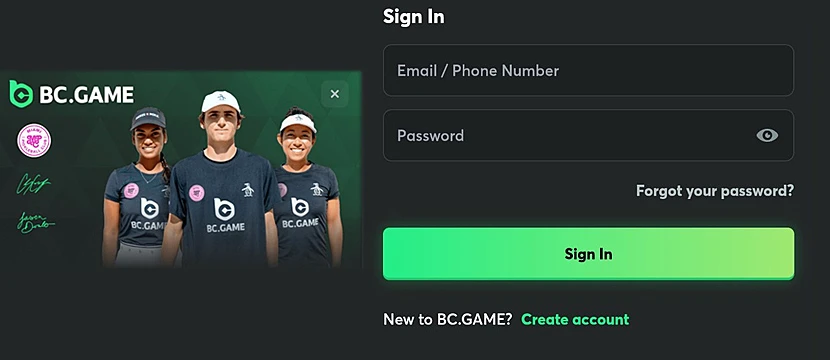
Once the BC.Game application is on your device, logging in is as easy as opening any other app. Whether you're using the BC.Game app for Android or accessing it through your iPhone, the platform keeps the login process quick, secure, and mobile-friendly. We have examined all possible touchpoints to make sure the transition from browser to mobile is seamless — giving players instant access to their gambling account, bonuses, and personal settings anytime they want.
1Launch the BC.Game app – Tap the BC.Game shortcut on your mobile device to open the application. It loads quickly, bringing you straight into the platform’s main lobby.
2Find the Login option – Look for the “Login” button in the top-right corner of the screen. It’s easy to spot as soon as the home page loads.
3Enter your account information – Type in your registered email or username along with your password. If you’ve linked a crypto wallet to your account, you can also log in using wallet authentication.
4Complete any security checks – If you enabled two-factor authentication (2FA), enter the code sent to your device to confirm your identity.
5Access your account – Once logged in, you’ll land directly in your account dashboard where you can manage settings, view bonuses, top up your balance, and start playing your favorite games instantly.
How to Make Your First Deposit Through the App
Funding your BC.Game account through the mobile application is just as smooth as playing. Whether you're using the BC.Game app for Android or iOS, the deposit process is designed to be fast, secure, and user-friendly. We have examined all possible deposit methods inside the app, and everything is streamlined to ensure a trustworthy and hassle-free start to your gaming experience.
1Open the BC.Game app – Tap the BC.Game shortcut on your device and log in if you haven’t already. The mobile platform loads fast, getting you straight into the action.
2Access your Wallet – Tap the wallet icon at the top of the screen. This is where you’ll manage all your crypto balances and transactions.
3Tap \"Deposit\" – Inside the wallet section, hit the “Deposit” button to pull up all the available funding options.
4Pick your crypto or payment method – BC.Game is crypto-first, but you’ll also see options like credit cards and e-wallets depending on your region. Choose the method that fits you best.
5Complete the transfer – Follow the instructions for your selected method. For crypto, you’ll get a deposit address or QR code. For cards or e-wallets, just enter your payment details.
6Start playing with your funds – Most deposits are processed almost instantly. Once the balance hits your account, you’re ready to grab bonuses, enter games, and explore the full platform.
How to Uninstall the BC.Game App
If you ever decide to remove the BC.Game application from your device, the process is quick and straightforward. Since the app runs as a Progressive Web App (PWA), uninstalling it is even easier than deleting a traditional application. We have examined all possible uninstallation methods to ensure that clearing the app from your Android or iOS device is safe, fast, and leaves no unnecessary files behind.
1Find the BC.Game shortcut – Locate the BC.Game icon on your Android or iOS home screen. Since it’s a Progressive Web App, it appears like a regular app shortcut.
2Press and hold the icon – Tap and hold the BC.Game app icon until a menu or options bar appears.
3Select "Remove" or "Delete" – On Android, tap "Remove" or drag the icon to the "Remove" option. On iOS, choose "Remove App" and then confirm by selecting "Delete."
4Clear browser data (optional) – If you want to fully clear your tracks, you can also go into your browser settings (Chrome or Safari) and delete cached data for BC.Game.
5Reinstall anytime – If you change your mind, you can easily install the BC.Game app again by visiting the official website and adding it back to your home screen.
Final Thoughts
After putting the BC.Game app through a full test across Android and iOS, I can say it's a solid option for players who want fast and secure mobile access to crypto gambling. We have evaluated the BC.Game application carefully across several key points — legality, usability, interface, and overall stability — and our experts recognized it as a trustworthy and practical solution.
Legally, the app runs under Curaçao Interactive Licensing, which gives it a recognized but more flexible regulatory framework. Usability is where it really shines: no downloads, no waiting — just a few taps, and the platform is ready on your screen. The interface is clean, interactive, and mobile-optimized, which keeps the gaming experience smooth. In terms of stability, even long sessions didn’t cause any glitches or freezes on either Android or iPhone.
Here are a few quick tips before you jump in:
- Install the BC.Game app only from the official website to stay safe and get the latest version.
- Set up two-factor authentication early — it's an easy way to secure your account.
- Keep your browser updated for the best stability and fastest gameplay through the mobile shortcut.
Frequently Asked Questions
Is the BC.Game app available on Google Play or the App Store?
No. The BC.Game app is not listed on Google Play or the App Store. Instead, you can install it directly from the official BC.Game website by adding a shortcut to your home screen.
Is the BC.Game app safe to use?
Yes. The BC.Game application is licensed under Curaçao Interactive Licensing (CIL) and uses secure encryption protocols to protect user accounts, transactions, and personal information.
How do I install the BC.Game app on Android?
Open Chrome on your Android device, visit the official BC.Game site, tap the menu button, and select “Add to Home Screen.” The app will appear as a shortcut, working like a native app.
Can I make a deposit through the BC.Game app?
Yes. Once logged in, tap the wallet icon, select “Deposit,” and choose your preferred method. BC.Game supports a wide range of cryptocurrencies and traditional payment options.
How do I uninstall the BC.Game app?
Press and hold the BC.Game shortcut on your home screen. On Android, drag it to “Remove.” On iOS, tap “Remove App.” You can reinstall it anytime through the official website.