

Casino Days App
Looking for a fast, safe way to play Casino Days on your phone? Find out how to download and install it, to use it for real money deposits, and even uninstall it if needed. We’ve tested the app ourselves to give you a clear picture of its features, security, and performance. Whether you’re new to mobile casinos or just want to avoid the app store hassle, you’ll find practical answers here.
In this guide you will find:
- Casino Days App Brief Review
- Casino Days App Screenshots
- Requirements for Installing
- How to Install a Casino Days Mobile App on Android
- Why Casino Days App is not Available in PlayMarket and AppStore
- How Safe is the Mobile Version of Casino Days
- How to Log In to Casino Days From the Mobile Application
- How to Make Your First Deposit Through the App
- How to Uninstall the Casino Days App
- Final Thoughts
- Frequently Asked Questions
Casino Days App Brief Review
| Feature | Details |
|---|---|
| Compatible Operating Systems | Android (APK download) |
| Application Version | 2.18.0 |
| Casino Days App Download Link | https://casinodays.com/en/casino-app |
| Download Cost | Free |
| App Category | Real Money Casino |
| Promo Code | Automatically applied upon registration |
| Welcome Bonus | 100% up to €500 + 100 Free Spins |
| Supported Countries | 199 countries worldwide |
| Application Languages | English, Finnish, French, Japanese, Norwegian, Thai, Hindi |
| License | Curacao eGaming |
| Customer Support | 24/7 Live Chat and Email |
The Casino Days mobile app is designed for players who prefer smooth gameplay without unnecessary clutter. It skips the overly flashy stuff and delivers what really matters — stable performance, fast-loading games, and a lightweight interface that feels right at home on Android. You won’t find an iOS version at the moment, but Android users can download Casino Days app for free directly from the official site in just a few taps.
According to our experts, the platform performs well even when you take a closer look. We’ve run a full Casino Days app test, exploring everything from navigation to deposit speed, and it delivered a consistently reliable experience. If you’re looking to install Casino Days app for quick access to real money casino games on mobile, the latest version is a solid and secure choice.
Casino Days App Screenshots
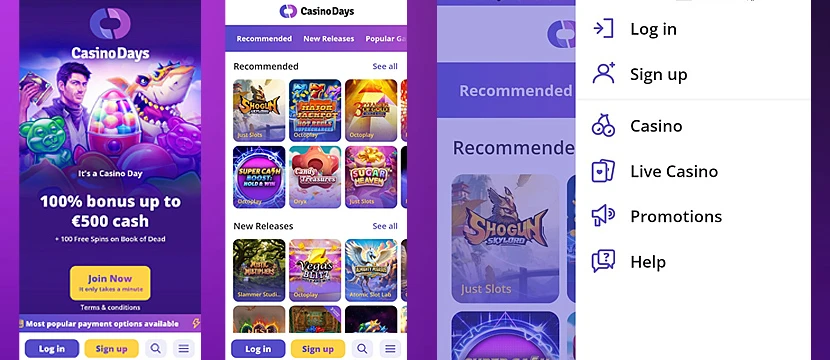
Here’s a quick look at what the Casino Days app really looks like on mobile. No mockups or polished promo art — just real screens from the app so you know what to expect.
The interface is simple and clean. Everything’s where it should be — game categories on top, main navigation at the bottom, and no annoying pop-ups or clutter in the middle. It’s clearly designed for easy use on smaller screens, and you don’t need to swipe through five menus just to launch a slot or check your balance.
Requirements for Installing
Before you install the Casino Days app latest version, make sure your device is ready. You don’t need the latest smartphone or loads of space — just a stable connection and a device that meets a few basic requirements. Most Android users won’t have any trouble here, but it’s always good to check.
| Requirement | Android |
|---|---|
| Operating System | Android 6.0 (Marshmallow) or later |
| Minimum Storage | 100 MB |
| RAM | 1 GB |
| Processor | 1.2 GHz quad-core processor or higher |
| Internet Connection | Stable internet connection |
| Additional Requirements | Age 18+ for gambling apps |
How to Install a Casino Days Mobile App on Android
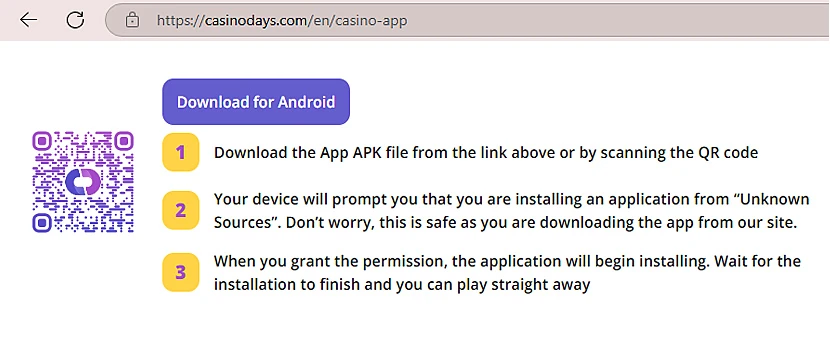
Getting the Casino Days app for Android device is simple and takes just a few steps:
1Go to the official Casino Days website – Open your browser on your Android phone and visit casinodays.com. You’ll find the download link for the app on the homepage — or scan the QR code if it’s available.
2Download the APK file – Tap the download button to get the Casino Days APK file. This is the installation file that works on Android phones and tablets.
3Allow installs from unknown sources – Your device might show a message about “Unknown Sources.” This is normal — since you’re installing the app directly, not through the Play Store. Go to your phone’s settings and allow the install. The file is safe if it comes from the official Casino Days site.
4Install the app – Once you’ve allowed the install, the app will begin installing automatically. It only takes a few seconds.
5Open the app and start playing – When the installation is complete, just tap the app icon to launch it. You can log in with your account or create a new one in the app — and you’re ready to start playing.
Why Casino Days App is not Available in PlayMarket and AppStore
Tried searching for the Casino Days app in Google Play or the App Store and came up empty? Don’t worry — that’s expected. The app isn’t there, and it’s not a mistake.
Here’s the deal: Google and Apple have pretty strict rules when it comes to real money gambling apps. If a casino doesn’t hold a local license in your country, it usually gets blocked from being listed — even if it’s safe and fully licensed elsewhere. Casino Days runs under a Curacao license, which is accepted in a lot of countries, but not always by app stores.
So instead of jumping through store restrictions, Casino Days just keeps it simple — offering the app as a direct Casino Days APK download from their website. No approval delays, no regional filters. Just tap the link, install the Casino Days app, and you’re in. It works just like any other app — only with fewer hoops to jump through.
How Safe is the Mobile Version of Casino Days
Security is one of the first things we look at when reviewing any mobile casino — and in this case, there’s no red flag. The Casino Days app uses SSL encryption to protect your connection, so anything you enter — whether it’s your password or card details — stays between you and the app.
The platform runs under a Curacao eGaming license, which isn’t just a stamp — it requires proper player protection, verified payment systems, and anti-fraud policies. During our Casino Days app test, we didn’t run into any suspicious redirects or risky permissions. You download the APK file directly from the official website, not through shady third-party links.
There’s no listing in Play Market or App Store, but that doesn’t make the Casino Days mobile app less safe. In fact, skipping the middleman gives the operator more control over the app version and updates — as long as you’re downloading from the source, you’re in good hands.
How to Log In to Casino Days From the Mobile Application
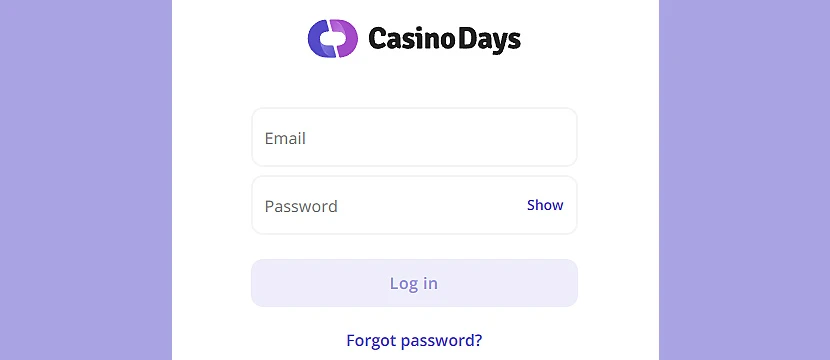
Once you install the Casino Days app, logging in is quick and takes just a few taps. Here’s how to do it:
1Open the Casino Days app – Tap the app icon on your Android device to launch it.
2Tap the "Log In" button – You’ll find the button in the lower part of the screen. Tap it to open the login form.
3Enter your email and password – Use the same details you used when signing up on the website. If you’re new, you can tap "Sign Up" to create an account directly in the app.
4Tap "Continue" – Once your credentials are filled in, tap the button to access your account.
5You’re in – You can now browse games, make deposits, or claim promotions through the app — just like on desktop.
How to Make Your First Deposit Through the App
Once you’re logged in, adding funds to your account through the Casino Days app is quick and secure. Here’s how to make your first deposit:
1Open the app and log in – Make sure you’re signed into your account.
2Tap the menu icon – You’ll find it in the bottom or top corner, depending on your screen size.
3Select "Deposit" – This will open the list of available payment options.
4Choose your preferred payment method – Casino Days supports various methods, including e-wallets, cards, and cryptocurrencies. Pick the one that works best for you.
5Enter the amount – Type in how much you want to deposit. Check the minimum deposit requirement if you're unsure.
6Complete the payment – Follow the instructions on your chosen payment method to confirm the transaction.
7Start playing – Once your payment is processed, the funds will appear in your balance — and you’re ready to explore the games.
How to Uninstall the Casino Days App
If you ever decide to remove the Casino Days app from your device, the process is quick and straightforward. Here's how to do it on Android:
1Go to your device settings – Open the settings app on your Android phone or tablet.
2Tap "Apps" or "Applications" – This section may be labeled slightly differently depending on your device model.
3Find the Casino Days app – Scroll through the list or use the search bar to locate the app.
4Select "Uninstall" – Tap the app, then press “Uninstall” and confirm when prompted.
5The app is removed – It will be deleted from your device, and no personal data will remain unless stored elsewhere (like your payment provider or email).
Final Thoughts
In this article, I’ve evaluated the Casino Days app across the things that actually matter — legality, usability, interface, and technical stability. After testing its performance and checking how it holds up on real devices, our team at SlotCatalog considers it a reliable option for Android users.
Legally, the app operates under a Curacao eGaming license. It’s not in the Play Store or App Store due to platform restrictions, but that doesn’t affect its legitimacy or safety when downloaded from the official site. From a user experience standpoint, the interface is mobile-first — clean, fast, and easy to navigate. No performance issues were found during our Casino Days app test, and both payments and account functions worked smoothly.
If you’re comfortable installing APKs and want quick access to a wide range of casino games, this app does exactly what it promises — without wasting your time or data.
Quick tips before you go:
- Skip app stores — download it directly from casinodays.com.
- Enable “Unknown Sources” only during installation.
- Log in through the app for faster deposits and easier access to game categories.
Frequently Asked Questions
Is the Casino Days app available on Google Play or the App Store?
No. The Casino Days app is not listed in the Play Store or App Store due to regional restrictions on real money gambling apps. It can only be downloaded as an APK from the official website.
Is the Casino Days app safe to use?
Yes. The app uses secure SSL encryption and operates under a Curacao eGaming license. As long as you download it from the official site, it is safe to use.
How do I install the Casino Days app on Android?
Go to casinodays.com, download the APK file, enable “Unknown Sources” in your settings, and follow the installation steps on your Android device.
Can I make a deposit through the app?
Yes. After logging in, tap on the menu and choose “Deposit” to access available payment methods and fund your account directly in the app.
How do I uninstall the Casino Days app?
Go to your Android device settings, find the “Apps” section, select Casino Days, and tap “Uninstall.” Your account stays active even if the app is removed.