

Verde Casino App
Looking for a fast, safe way to play Verde on your phone? Download and install it, to use it for real money deposits, and even uninstall it if needed. We’ve tested the app ourselves to give you a clear picture of its features, security, and performance. Whether you’re new to mobile casinos or just want to avoid the app store hassle, you’ll find practical answers here.
In this guide you will find:
- Verde App Brief Review
- Features & Functions
- Compatibility with Devices
- How to Download and Install the Verde App
- How to Update the Verde App to the Latest Version
- Registration in the Verde Application
- Bonuses & Promotions
- Deposits & Withdrawals via the App
- Security of the Verde Application
- Support for the Verde Mobile App
- Possible Problems with the Verde App
- Screenshots of the Verde App
- Final Words
- Frequently Asked Questions
Verde App Review
| Feature | Details |
|---|---|
| Compatible Operating Systems | Android, iOS |
| Application Version | 8.5.1 (154) |
| Verde App Download Link | https://verdecasino.com/en/mobile-application |
| Download Cost | Free |
| App Category | Real Money Casino |
| Promo Code | Not required. Bonus applied automatically. |
| Welcome Bonus | 100% up to €1,200 + 220 Free Spins |
| Supported Countries | 172 countries worldwide |
| Application Languages | English, English (Canada), German, Polish, Portuguese (Brazil), Portuguese, Spanish, Spanish (Peru), Spanish (Chile), Hungarian, French (Canada), French (Belgium), Vietnamese, Greek, Japanese, Finnish, Thai, Chinese, Italian, Bulgarian, Russian (Latvia), Russian (Lithuania) |
| License | Antillephone (Curacao) |
| Customer Support | 24/7 Live Chat and Email |
The Verde mobile app is a lightweight and interactive solution for players looking to gamble on the go. This Verde casino app focuses on stable performance and responsive design, making it easy to enjoy a full gambling session on your phone. You can download the Verde app for free as an APK or use the QR code for the Verde app for iOS, which works on devices with iOS 12.0 and above.

According to our experts, the latest Verde app version provides a trustworthy gaming experience with all the necessary features in place. We have examined all possible aspects during our Verde app test, including payment speed, game loading, and support quality. If you're ready to install Verde app and dive into real money gaming, the official application is a smart way to get started.
Features & Functions
The Verde mobile app delivers all core functions needed for a complete gambling experience. You can register, verify your account, make deposits and withdrawals, and claim bonuses directly from your mobile device. The app gives access to Verde’s full game library, including slots, table games, and live dealers. Players can also activate promo offers, view wagering progress, and join tournaments. Navigation is optimized for touchscreens, and the layout adjusts well to both phones and tablets. Push notifications keep users informed about updates and promotions. All transactions and personal information are protected using the same security standards as the desktop platform. Whether you download the Verde app for Android or install the Verde app for iOS, the application covers everything you need to play safely and conveniently on mobile.
Compatibility with Devices
The Verde app is compatible with most modern devices running Android 6.0.0 or iOS 12.0 and above. On Android, the app comes as an APK file from the official site. For iOS, installation is done via a QR code with no App Store involved. We tested the app on multiple screen sizes and found the layout adjusts well, even on older phones. Features like swipe navigation, quick game access, and secure login work the same across both platforms. Verde also supports basic accessibility options for smoother use on supported devices.
| Parameters | Android | iOS |
|---|---|---|
| Operating system version | Android 6.0.0 or higher | iOS 12.0 or higher |
| Compatible devices | Most Android phones and tablets (Samsung, Huawei, Xiaomi, etc.) | iPhone, iPad, and iPod Touch |
| Accessibility | Supports screen readers and basic accessibility features | Supports standard iOS accessibility settings |
| User interface | Touch-optimized and responsive across screen sizes | Clean layout with quick navigation and iOS adaptation |
How to Download and Install the Verde App
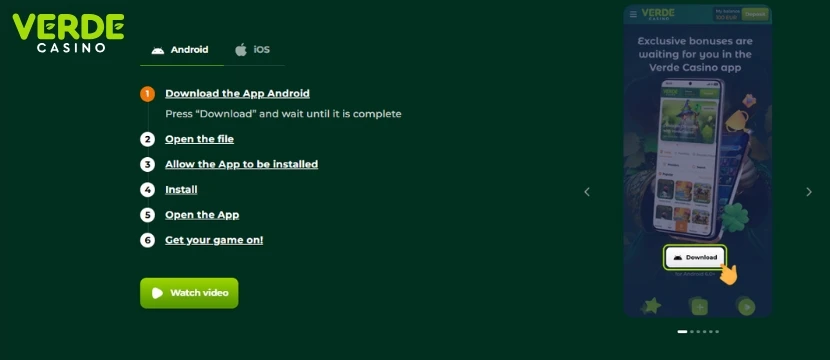
Verde keeps things simple when it comes to mobile access. There’s no need to dig through app stores or search third-party sites. Everything you need is right on the official website. With a quick scan or tap, the installation starts — and you're only minutes away from spinning, betting, and unlocking bonuses on your phone.
1Open the official Verde website – Head to the mobile version of the site using your phone’s browser and look for the app section.
2Scan or tap the QR code – This code works for both Android and iOS. Use your camera or tap it if you're already on your mobile device.
3Download the app – After scanning, you’ll land on the right download page for your system. Just follow the prompt to grab the latest Verde app version.
4Approve the install – Your device may ask to confirm installation from unknown sources. Approve the request — it’s safe if you’re using the official QR code.
5Finish setup – Once installed, launch the app, adjust your preferences if needed, and you’re in. The full Verde experience is now in your pocket.
How to Update the Verde App to the Latest Version
Verde doesn’t use automatic updates through app stores, so it’s up to players to keep things fresh. Updates roll out quietly — better speed, smoother gameplay, maybe a few new tricks under the hood. To make sure you’re always running the latest version, just check back in the mobile section of the official site once in a while. It only takes a minute.
1Go to the Verde website – Open your phone’s browser and head to the mobile app section where you first downloaded the application.
2Scan or tap the QR code – The same code always points to the newest version, whether you're on Android or iOS.
3Check the version number – If it’s newer than the one currently installed, it’s time for a quick update.
4Download the latest app file – Tap to get the updated APK or iOS installer and follow the same steps as before.
5Install and open – The app will replace the old one without deleting your data. Launch it and you’re good to go.
Registration in the Verde Application
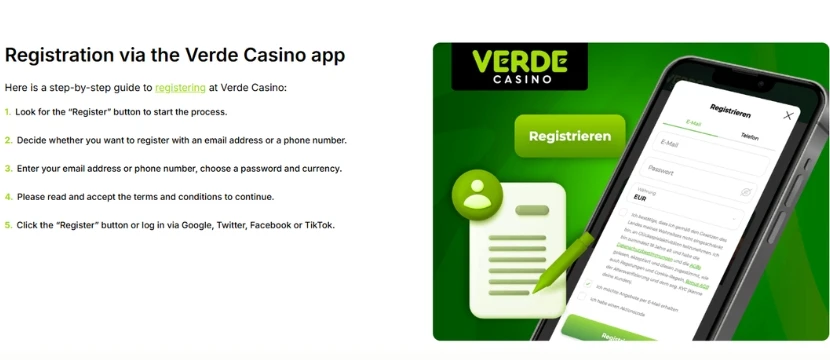
Creating an account in the Verde app is quick, clean, and completely mobile-friendly. No bouncing between tabs or jumping through unnecessary hoops — just launch the app, fill in the essentials, and you’re in. Once registered, you’ll be able to deposit, claim bonuses, and dive straight into real games without delays.
1Launch the Verde app – Tap the icon on your home screen to get started.
2Tap “Register” – You’ll find it front and center on the main screen. One tap opens the signup form.
3Fill in your details – Add your email, choose a password, and select your country and currency. Keep it accurate — this info links to your account and transactions.
4Agree to the terms – Confirm you're over 18 and accept the platform’s rules with a single checkbox.
5Complete signup – Hit the button to finish. Your account will be active instantly, and you'll be logged in automatically.
Bonuses & Promotions
Verde doesn’t just stop at great games — it backs them up with a bonus system designed to keep things interesting week after week. From a generous welcome bonus to long-term rewards through its loyalty program, the platform offers real incentives to stay active. Here’s how the Verde application rewards its players.
Welcome Bonus
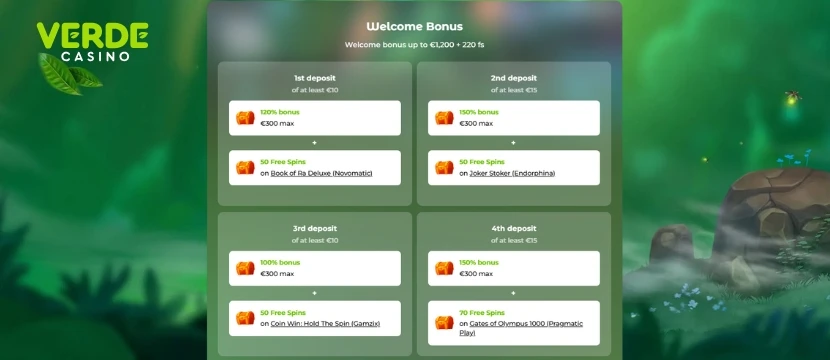
All new users who register through the Verde app are eligible for a welcome package of 100% up to €1,200 + 220 Free Spins. The bonus is automatically applied after your first deposit, with no promo code required. Free spins are usually credited in sets across selected slots, and the entire offer is available right from your mobile device. For more details on how these offers work, visit our full guide to casino welcome bonuses.
Loyalty Program
Verde’s loyalty system rewards every wager you place. For every €10 spent (excluding live games), you earn 1 point. These points determine your status level and can be exchanged for real money at various rates. Higher levels unlock better cashback percentages, birthday gifts, and exclusive weekly bonuses.
| Levels | Statuses | Points | Exch. rate | Weekly bonus | Cashback | Birthday bonus |
|---|---|---|---|---|---|---|
| 1-9 | Verde | 0 | - | - | - | - |
| 10-19 | Leprechaun | 500 | 500:1 | 70% + 25 FS Triple Chili | 3% | + |
| 20-29 | Elf | 1,500 | 450:1 | 90% + 30 FS Big Bass Bonanza | 3% | + |
| 30-39 | The Dragon | 10,000 | 400:1 | 100% + 35 FS Queen of Fire | 5% | + |
| 40-49 | Mage | 20,000 | 350:1 | 110% + 40 FS Wild Overlords | 5% | + |
| 50-59 | Master of Bronze | 50,000 | 300:1 | 120% + 45 FS Book of Sirens | 7% | + |
| 60-69 | Master of Silver | 100,000 | 250:1 | 130% + 50 FS Wolf Gold | 7% | + |
| 70-79 | Golden Overlord | 200,000 | 200:1 | 140% + 70 FS Greatest Catch | 9% | + |
| 80-89 | Platinum Overlord | 500,000 | 150:1 | 150% + 90 FS Book of Fallen | 9% | + |
| 90-99 | Diamond Overlord | 1,000,000 | 100:1 | 200% + 100 FS Big Bass Bonanza | 12% | + |
Cashback

Verde gives players a second chance through its weekly cashback system. The amount you get depends on your loyalty level and is calculated using this formula:
Weekly Cashback = (In - (Out + Prizes + Current Balance)) × K
- In – total deposits from Monday 00:01 to Sunday 23:59 (GMT)
- Out – total withdrawals in the same period
- Prizes – bonuses and tournament winnings
- Current Balance – your real money balance at the time of calculation
- K – your cashback coefficient based on loyalty status (e.g., 3%–12%)
Cashback is calculated every Monday at 00:00 GMT and added to your bonus balance automatically. For a closer look at how cashback bonuses work, visit our full cashback bonus guide.
Deposits & Withdrawals via the App
The Verde app doesn’t make you jump through hoops when it’s time to deposit or cash out. Everything’s handled inside the app — no redirects, no clunky browser steps. Whether you’re topping up your balance or withdrawing winnings, the process is smooth, secure, and built for mobile use. Here’s how to do both in just a few taps.
How to Make a Deposit
1Open the Verde app – Log in and head to your main dashboard.
2Tap “Deposit” – You’ll find this either on the home screen or under the wallet icon in the menu.
3Pick a payment method – Choose what suits you best: bank card, e-wallet, crypto, voucher, or other available options.
4Enter the amount – The app will show the min and max limits for your selected method, so no guesswork needed.
5Confirm and pay – Complete the transaction using your chosen method. Funds usually show up instantly.
6Get your bonus – If it’s your first deposit, the welcome bonus is credited automatically — no code required.
How to Make a Withdrawal
1Log into the Verde app – Use your login as usual.
2Go to your profile – Tap your avatar or open the menu to find the wallet or account section.
3Select “Withdraw” – This will open a list of your verified payout methods.
4Choose your method – Only methods you’ve used for deposits or verified manually will be available here.
5Enter the amount – Make sure it fits within the withdrawal limits and doesn’t exceed your balance.
6Send the request – Verde usually processes withdrawals fast, though final timing depends on the payment system and your verification status.
Security of the Verde Application
The Verde app doesn’t cut corners when it comes to security. All connections are protected with SSL encryption, so no one can snoop on your data while you deposit, withdraw, or play. The app isn’t available in app stores, and that’s intentional. It can only be installed via QR code from the official site, which helps block fake versions and tampered APKs. Logins are protected with optional two-step verification, and all cashout requests go through standard KYC checks. Verde also runs automated background systems that flag unusual behavior before it becomes a problem. You focus on the games. Verde handles the security.
Support for the Verde App
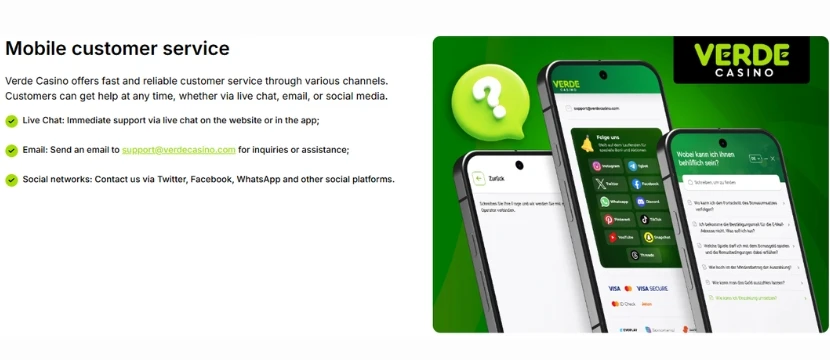
Got a question or ran into a bug? The Verde app has support built in. Live chat is available 24/7 and opens directly from the main menu. No bouncing to browser tabs or digging through help pages. The team responds fast and actually knows the app inside out. Email support is also an option if you need to send files or follow up later. For smaller stuff, there’s a short help section inside the app covering payments, bonuses, and basic account tools. Everything support-related stays in-app, where it should be.
Possible Problems with the Verde App
The Verde app is generally stable, but like any mobile application, occasional issues may appear. Most are minor and can be resolved quickly. Below are the most common problems players experience and how to address them effectively.
App does not install
If the installation does not begin after downloading, your device may be blocking the file. Open your settings and enable installation from unknown sources. This step is required because the app is distributed via QR code, not through app stores. If the issue continues, delete the file and download it again using the official QR code.
Login issues
Failed login attempts are often caused by incorrect credentials. Double-check your email and password fields. If needed, use the password reset option. For locked accounts or repeated errors, contact Verde support through live chat for account recovery assistance.
Deposit not received
If your deposit does not appear in your balance, refresh the app and confirm the transaction went through. If the payment was processed but the funds are still missing, contact support with the transaction ID. They will investigate and resolve the issue promptly.
Slow performance
If the app runs slowly or lags, try closing unused background applications and switching to a stable internet connection. Reinstalling the latest version from the official QR code can also help. If the problem persists, report it to support for further assistance.
Screenshots of the Verde App
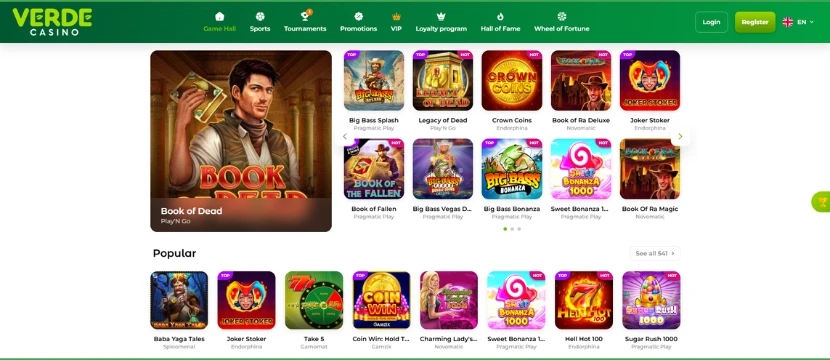
The Verde app uses a bright, responsive layout that fits naturally on mobile screens. Game categories, providers, and search tools are placed front and center, while all core features like bonuses, settings, and support are just a tap away through the bottom menu or side panel.
Final Words
I have evaluated the Verde app according to the following criteria: legality, usability, interface quality, and stability. Based on our full analysis and hands-on testing, our experts have recognized the Verde application as a trustworthy mobile platform for real money gambling. It operates under a valid Antillephone license, supports secure transactions, and offers full functionality for both Android and iOS through a direct QR code install.
The user interface is lightweight, responsive, and well-suited for mobile play. All essential features, including payments, bonuses, loyalty tools, and live chat, are available in-app with no need to switch to a browser. The app runs smoothly on most modern devices. When issues occur, they are minimal and easy to resolve.
Quick tips:
- Always install the app using the official QR code to avoid security risks.
- If a deposit doesn’t show up, check your payment status before contacting support.
- Check the mobile app page regularly for updates or a newer APK version.
Frequently Asked Questions
Is the Verde app listed on Google Play or the App Store?
No. The Verde app is not available on Google Play due to regional gambling policies. It can be downloaded as an APK from the official site. For iOS users, the app can be installed by scanning the QR code provided on the site.
Is the Verde app safe to use?
Yes. The Verde mobile app is licensed by Antillephone and uses secure encryption to protect your personal data and transactions. We recommend only installing it through the official QR code to ensure the application has not been modified.
How do I install the Verde app?
Scan the QR code on the official Verde site. This will start the download automatically. After downloading, allow installation from unknown sources in your settings and proceed with installation. iOS users will also use the QR code to begin installation.
Can I deposit and withdraw money through the app?
Yes. The app supports full cashier functionality. You can deposit, withdraw, and track your transaction history directly in the app without switching to a browser. All common payment methods available on the desktop version are supported here as well.